A homescreen that sells the new agents and the quota at once
Julius greets you with one analysis prompt, then surrounds it with an agent launch modal, a feature tip and a message counter that all point to Upgrade.
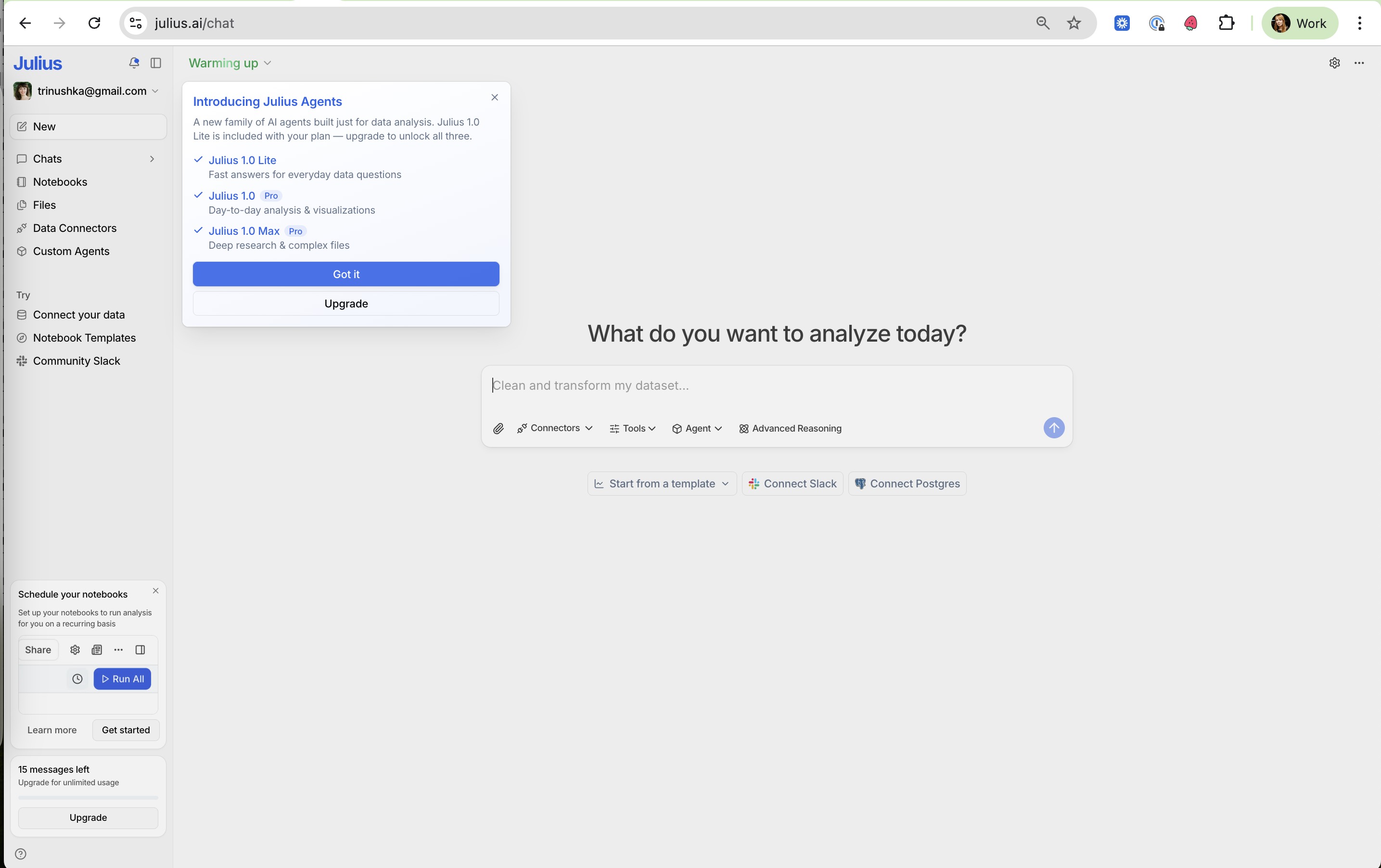
Home with the Julius Agents launch
The prompt box is the main job, while three cards around it introduce new features and the upgrade.
-
1
Tiers shown as a family (working)
Lite, 1.0 and Max are listed with one-line jobs, and the Pro tags show which two you don't have.
-
2
Dismiss is the primary (working)
"Got it" is the filled button and "Upgrade" the outline, so the launch informs before it sells.
-
3
One question, one box (working)
"What do you want to analyze today?" with an example placeholder makes the first action obvious.
-
4
Starter chips under the input (working)
Template, Slack and Postgres shortcuts help users who arrive without a dataset.
-
5
Three nudges at once (not working)
The agents modal, "Schedule your notebooks" and the quota card all compete for attention on first load.
-
6
Quota in plain words (working)
"15 messages left" with an Upgrade button turns the free limit into a visible countdown.
Takeaways from Julius
- Make the core action the visual center, and keep launch modals dismiss-first.
- Show the free quota as a simple count next to the upgrade button.
- Limit first-load announcements to one, or they cancel each other out.