Layered consent before AI sees your data
Preset makes AI Assist an admin opt-in and spells out exactly what is shared with OpenAI, with sample data as a separate choice.
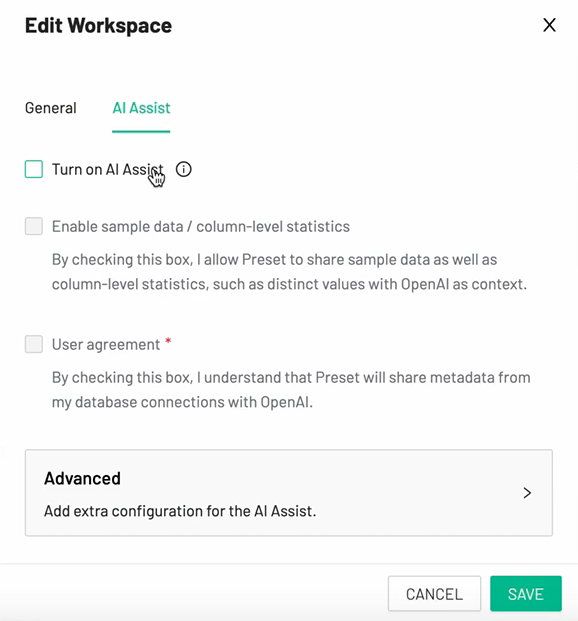
Edit Workspace: AI Assist
Everything is off by default, and each data-sharing level is its own checkbox with plain disclosure text.
-
1
Off until turned on (working)
"Turn on AI Assist" is unchecked and the rest is disabled until it is.
-
2
Names the vendor and the data (working)
Sample data and "distinct values" shared "with OpenAI" is a separate opt-in from metadata.
-
3
Label says nothing (not working)
"User agreement" is the visible label, while what you agree to is in grey text below.
-
4
Advanced tucked away (working)
Extra configuration sits behind a collapsed row.
Takeaways from Preset
- Split AI data sharing into levels, so cautious admins can say yes to the minimum.
- Name the third party and the exact data in the consent copy.
- Put the meaning in the checkbox label, not only in the fine print.