An upgrade popup injected into someone else's page
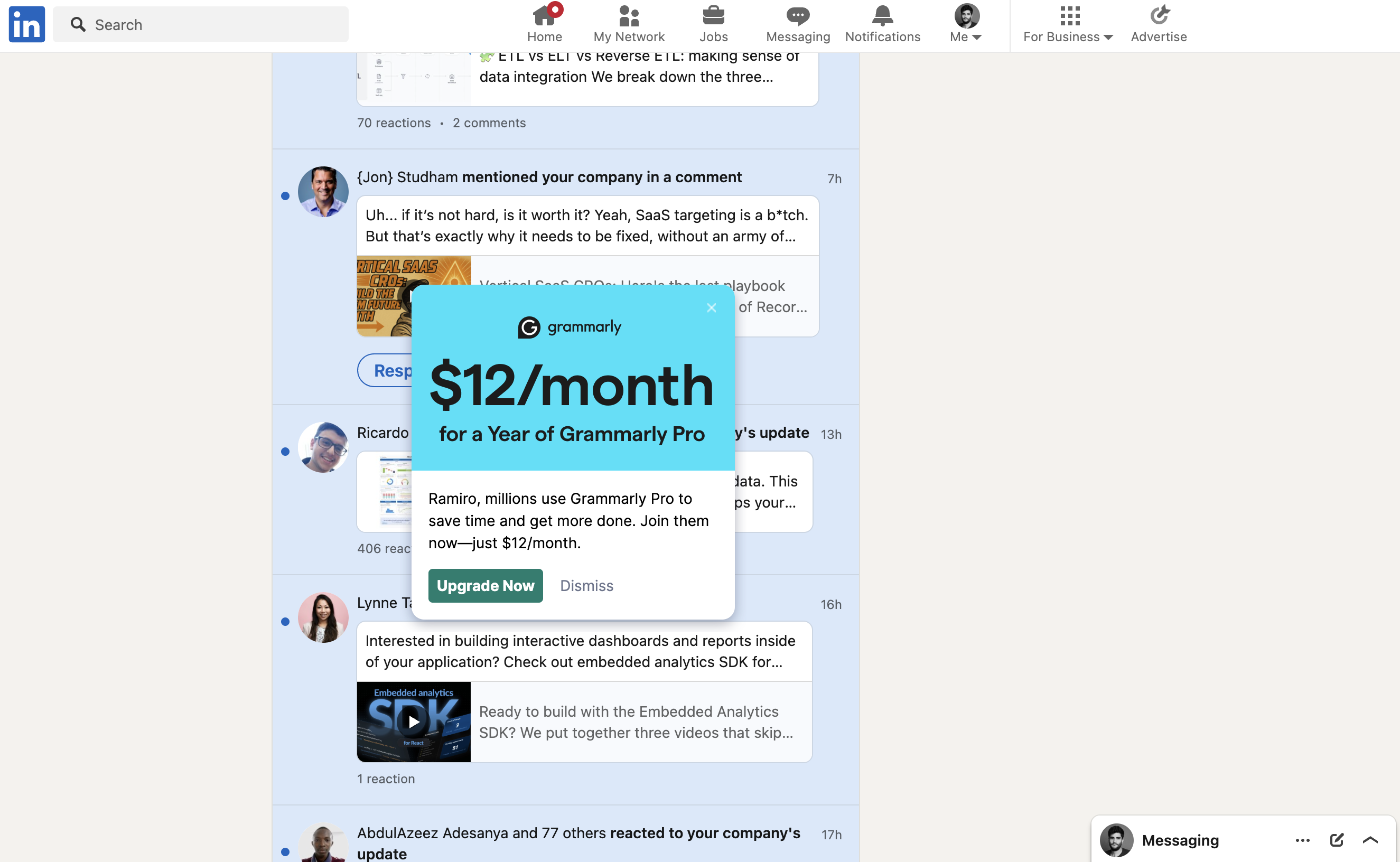
Grammarly's browser extension drops a $12/month upgrade card on top of the LinkedIn notifications feed, a pattern to avoid.
$12/month popup over LinkedIn
The extension shows a full upgrade offer in the middle of LinkedIn, covering the posts the user came to read.
-
1
Covers the host page (not working)
The card hides a "Respond" button and half of two notifications; the user did not ask for Grammarly here.
-
2
Price as the headline (working)
"$12/month" in huge type anchors on a small monthly number.
-
3
Annual lock-in in the subhead (not working)
"for a Year of Grammarly Pro" means a yearly commitment, easy to miss under the big monthly price.
-
4
Name plus crowd (working)
"Ramiro, millions use Grammarly Pro" pairs personalization with social proof.
-
5
Easy dismiss (working)
"Dismiss" sits right next to the CTA, so at least escaping is one click.
Takeaways from Grammarly
- Show upgrade prompts where the product is being used, not on top of another site's content.
- If you lead with a monthly price on an annual plan, make the yearly commitment equally visible.
- Interrupting a user who isn't writing burns goodwill faster than it earns upgrades.